RPM repo not found connection errors on Centos Redhat duplicate problems

These are the steps I use when yum update on CentOS or Red Hat fails because of duplicate packages or a damaged RPM database, plus two network fixes for when yum can’t reach its repositories at all. I wrote them in 2018 for CentOS 6 and 7, which use yum. yum -y update command failing The command line will show messages like: xxx is outdated and v abc will be installed but at the end it shows a duplicate binary, please remove the duplicate first. ...

July 24, 2018 · 3 min · Harshvardhan Malpani

Linux – Rescue disk how to reset root password and unblock yourself if locked out

Centos as test server Current situation – you are locked out, cant use WHM or SSH or anything else to login. You may or may not remember the password. In any case you can reproduce the following steps to unblock yourself. Use any other linux OS cd which can run live. I prefer FINNIX iso for such cases\ Mount your main disk. mount /dev/vda1 /mnt Reset password if needed to chroot /mnt passwd Enter new password for root and confirm\ Reboot and done. In case you have been locked out due to WHM cpanel:\ ...

July 23, 2018 · 2 min · Harshvardhan Malpani

Rakit library for PHP validation

To enable hassle-free validation, use the Rakit library. Rakit Validation is a standalone PHP library for checking form input. Its rules are written the same way as Laravel’s (required, email, min:6 and so on), but it doesn’t need a framework, so it fits plain PHP projects well. First install Composer and then run composer require rakit/validation in your project directory. That downloads the library into vendor/ and adds it to your composer.json. Load it in your script with require 'vendor/autoload.php';. ...

July 22, 2018 · 2 min · Harshvardhan Malpani

Installing Magento Common Issues

These are my notes from installing Magento 2 on a local Windows machine, with a local PHP and Apache stack such as XAMPP and commands run from cmd. Most of the errors on a first install come from the PHP setup rather than from Magento itself, and the last two steps fix the common problem of the storefront and admin loading without any styling. Following are the steps to complete a Magento install error-free: ...

July 22, 2018 · 2 min · Harshvardhan Malpani

PHP Malware – Important regex to bust infected website

When a PHP site (WordPress, Magento or anything else) gets hacked, the attacker usually leaves backdoors in several files so they can get back in after you’ve cleaned up the obvious damage. The code is normally obfuscated, so it won’t show up by searching for something readable. These are the grep searches I ran over an infected site to track it down. Each one looks for a pattern that’s common in obfuscated PHP malware. ...

July 20, 2018 · 5 min · Harshvardhan Malpani

Light flick effect on image hover – CSS

This CSS sets up a “flick” or shine effect: a band of light that sweeps diagonally across an image when you hover over it, the kind you often see on product and collection thumbnails in online shops. It’s done with a CSS pseudo-element, so there’s no extra HTML or JavaScript. .collection-grid-item__link is the class of the collection image links in the theme I used it on. Replace it with the class of your own image link or wrapper. ...

July 19, 2018 · 3 min · Harshvardhan Malpani

How to install wordpress on cPanel

WordPress is a free and open-source content management system (CMS) based on PHP and MySQL. Features include a plugin architecture and a template system. Many cPanel hosts offer a one-click installer for WordPress, but installing it by hand only takes a few minutes and you know exactly what’s on your server. All you need is access to cPanel and a domain pointed at the hosting account. The screenshots were taken in 2018, so your cPanel and the WordPress installer may look a little different, but the steps are the same. ...

July 18, 2018 · 3 min · Harshvardhan Malpani

Commands not to be used on terminal as a root user

The root user can do anything on a Linux server, including wrecking it with a single typo, and nothing stops to ask “are you sure?”. These are two commands that are quick to type and do a lot of damage when run as root. First one on list is the infamous 8 characters in that particular order rm -rf / rm removes files, -r makes it work through every directory recursively, -f forces it without asking or complaining, and / is the top of the whole filesystem. As root, that means deleting the operating system, your websites, your databases and everything else on the server, with no recycle bin to restore them from. ...

July 17, 2018 · 3 min · Harshvardhan Malpani

Basics about advertisements and Google Adsense

On 15th Year Anniversary of GOogle Adsense and their partnerships with Publishers, google published a youtube video briefly explaining all the basic keywords related to Adsense. Transcript: 15 words to sum up 15 years? That’s easy! Okay, let’s go. Content Content is at the heart of the web. And publishers? You power that web. Without you that place would be quite empty. Ads? Ads bring the revenue that helps to fund it all while helping you reach your… Goals! Goals like growing your business, doing something you love and sharing it with the world creating… Memories? So many good memories! You’ve told us that Adsense has funded your weddings, helped you buy your homes or hire new teams. We feel part of your… Community. A community that grows with you recommending us. Thank you! Beginnings. It’s been 15 years since we ran our first ads, they were text only back then. Today? Today Adsense is truly global! Urdu, Japanese or French – We speak 45 languages. And counting. Change…is constant, especially on the web. We’ve been evolving with you and your audience needs for the past 15 years, to help you provide the best possible… …Experiences. As the look and feel of websites have improved over the years we built native ads to complement them, while always giving you the… Control. To decide what type of ads will show on your site. Platforms? All of them. Mobile, Video and whatever will come next – we have you covered. Time. Saved. With smart automated ad placements, keeping things simple for you so that you can focus on creating great content. Simplicity. Always. Our team’s goal: making it easier to grow your business. Okay and last but not least. Happy Birthday! Absolutely. 15 years is a milestone we should all celebrate. But the web doesn’t wait so time to get back to work. Can I finish my cake first? ...
July 3, 2018 · 2 min · Harshvardhan Malpani

How to Disable Default "Quick Access" aka "Home View" in Windows 10 File Explorer? – AskVG

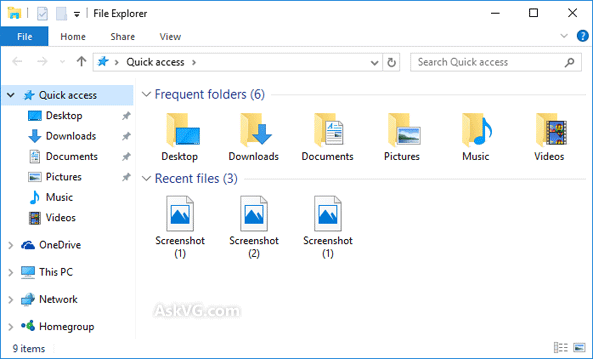
If you are using Windows 10 or have seen the OS in any computer, you might be aware of the new Home aka Quick Access View introduced in Windows 10 File Explorer (previously known as Windows Explorer or My Computer). This new Quick Access or Home view is the default page of File Explorer in Windows 10 and whenever you open File Explorer using its shortcut icon or WIN+E hotkey, this new view is shown in File Explorer. It shows frequently used folders and recently used files list in File Explorer as shown in following screenshot: ...

June 16, 2018 · 3 min · Harshvardhan Malpani