How to upload files to 000webhost?

Hello Everyone and welcome to tutes.in. Today we are going to see ‘How to upload your images and HTML files to your web hosting.’ These are small things but could be confusing in the beginning, as it was to me. **One quick fact:**000web host is an open source project of Hostinger. Let’s get back to the topic. How to upload files to the web host? Here is a step by step guide to uploading your file to the web host, specifically t0 000webhost. ...

October 26, 2018 · 1 min · Harshvardhan Malpani
CMS

Top CMS out there in 2018.

CMS: A content management system is a software that helps us to manage our content and site. You can literally manage everything from a blog to an e-commerce site, using CMS. You can manage an article if you have a blog, or manage your product if it is an e-commerce business. It has made our life so easier that we just can’t imagine having a site without CMS. You can operate most CMS out there even if you have no prior technical knowledge. ...

October 25, 2018 · 3 min · Harshvardhan Malpani
wp difference

WordPress.com v/s WordPress.org : The difference.

WordPress: The most popular CMS, yet there is one thing that keeps on confusing the newbies. And that is the difference between wordpress.com and wordpress.org. I myself have been confused about the difference, which once made me choose the wrong one. (as per my needs.) But I don’t want this to happen with you, hence here is an article to clear this thing out. What’s the difference: The very first difference is in the domain extension. ...

October 21, 2018 · 2 min · Harshvardhan Malpani

How to use VestaCP Cli Commands? – Linux

VestaCP comes with a set of command-line scripts, all named v-something and stored in /usr/local/vesta/bin, that do the same jobs as the web panel: adding users, domains, databases, SSL certificates and so on. VestaCP is no longer maintained, but these notes still apply to servers that run it. There are a lot of vestacp commands which are useful in automating things, but when you run them from an ordinary SSH session you may see this error: ...

October 20, 2018 · 4 min · Harshvardhan Malpani

How to change PHP versions in VestaCP Ubuntu – Downgrade Upgrade 5.6, 7.1 and 7.2

On Ubuntu 18.04, VestaCP uses PHP 7.2, because that’s the version Ubuntu ships. Some applications needed an older PHP at the time (older Magento 2 releases, for example, didn’t support 7.2 yet), so I switched the server to PHP 7.1. The same steps work for any version the PPA below provides, such as 5.6: replace 7.1 with that version in every line. Run these over SSH as a user with sudo rights. Since the commands change the PHP version for every site on the server, check that all of them work with the version you’re switching to. ...

October 20, 2018 · 3 min · Harshvardhan Malpani

How to remove all tables from MySQL Database?

This drops every table in a MySQL database but keeps the database itself. I use it to empty a database before importing a fresh dump when my MySQL user isn’t allowed to run DROP DATABASE and CREATE DATABASE, which is common on shared hosting. Warning: this permanently deletes every table in the selected database, with all its data. There is no undo. Before you run it: Take a backup, for example with mysqldump, and check that the backup file isn’t empty. Make sure you’re in the right database: SELECT DATABASE(); shows the one currently selected. Preview exactly which tables will go by running the same lookup the script uses: SELECT table_name FROM information_schema.tables WHERE table_schema = DATABASE(); Connect to your MySQL host and select the database to be used. Example: use notfavoritedb; where notfavoritedb is your database name. Then enter the SQL commands given below: ...

October 19, 2018 · 3 min · Harshvardhan Malpani

This is what CSS can do.

Are you ready for the magic? I am saying this because I believe that coding is closest to a superpower that we have. And the best part is that anyone can achieve this superpower. Here we are going to see how a single HTML file can look entirely different with just the change in CSS file. Mind that no front-end-framework has been used in the upcoming designs, it is just the beauty of pure CSS. ...

October 19, 2018 · 2 min · Harshvardhan Malpani

Quantum Computers: Technology from the future.

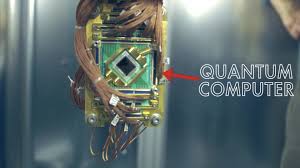
Either you talk about research, space exploration, or advancement of new technologies. Computers have become an inseparable part of our life. In the last few decades, we have reduced the size of the computer and increased its computation power. Today’s smartphones are much smaller and faster than the giant military computers 50 years ago. We have also been able to build super-computers, currently the most powerful system. Even after so much advancement in computers, there is still some limitation that has not been conquered yet! ...

October 18, 2018 · 3 min · Harshvardhan Malpani

Deploying a live site with free Domain and Hosting.

Hello everyone! In this article, we are about to create an entirely new site from scratch with free domain and free hosting. I am going to create one for the sake of this tutorial, which you can visit to check at the end of this article. Before we start, let me clear this for one last time: for the domain, we are using freenom.com and for hosting we are using 000webhost.com. Let’s do it: ...

October 15, 2018 · 3 min · Harshvardhan Malpani
binary code

Bit & Byte: The storage system.

You may have heard Bit & Bytebefore, but do you really know what is it? How does the computer storage system work? We are continually generating a lot of data every second, hence there should be a storage system strong enough to handle it all. In this post, we are gonna talk about this storage system. “Over 2.5 quintillion bytes of data are created every single day, and it’s only going to grow from there. By 2020, it’s estimated that 1.7MB of data will be created every second for every person on earth.” In the next article, we will also talk about the next generation of computer storage system (Quantum Computing.) What is Bit & Byte? A Bit is the smallest or basic unit of computer information which has only two values “0 or 1”. These two values can also be defined as “true or false” and “yes or no”, depending on the binary code. A Byteis the smallest unit of memory. One byte is made up of eight bits, that means one byte is one character of information and is comprised of eight bits (eight 1’s or 0’s). Here is a table to clear out your confusion. Unit\Value Unit Value 0 (Off) or 1 (On) 1 Bit 8 Bits 1 Byte 1,024 Bytes 1 Kilobyte 1,024 Kilobytes 1 Megabyte 1,024 Megabytes 1 Gigabyte 1,024 Gigabytes 1 Terabyte 1,024 Terabytes 1 Petabyte 1,024 Petabytes 1 Exabyte 1,024 Exabytes 1 Zettabyte What is 32 bit / 64 bit? Many times while downloading a software, we get to see two options – ” download in 32 bit” or “download in 64 bit”. So, let’s see what is 32 bit / 64 bit? The terms 32-bit and 64-bit define the fixed-size piece of data a processor can transfer to and from memory. So, in theory, 64-bit computers can handle data twice as fast 32-bit systems. The term for 64-bit computer architecture is x64, and the 32-bit computer architecture is most commonly known as x86and was based on the Intel 8086 / 8088 processor. The Intel 8086 / 8088 processor was found in the original stand-alone Pac-Man video arcade console. The storage system: Different users can have different storage requirements. Knowing what a computer is going to be used for (and of course many computers are used for a variety of purposes) is hence very important when planning storage requirements. So let’s continue with some of the available storage devices and technologies. HARD DISK STORAGE: Spinning hard disk (HD) drives are today the most common means of high capacity computer storage, with most desktop and laptop computers still relying on a spinning hard disk to store their operating system, applications programs, and at least some user data. RAID: On servers and high-end PC workstations (such as those used for high-end video editing), at least two hard disks are often linked together using a technology called RAID. This stands for “redundant array of independent disks” (or sometimes “redundant array of inexpensive drives”), and stores the data in each user volume on multiple physical drives. DIRECT ATTACHED STORAGE (DAS): Except where two internal hard disks are considered essential on the basis of performance, a second hard disk is a today most advisably connected as an external unit, or what is sometimes now known as a “DAS” or direct attached storage drive OPTICAL DISK STORAGE: Almost all optical storage involves the use of a 5″ disk from which data is read by a laser. Optical media can be read-only, write-one, or rewritable, and currently exists in one of three basic formats – CD(compact device), DVD(digital versatile disk), BD(blue ray disk). SOLID STATE DRIVES: Solid state storage devices store computer data on non-volatile “flash” memory chips rather than by changing the surface properties of a magnetic or optical spinning disk. With no moving parts solid state drives (SSDs) — are also very much the future for almost all forms of computer storage. FLASH MEMORY CARDS: Flash memory cards were developed for digital cameras and mobile computers. They consist of a small plastic package with a contact array that slots into a camera or other mobile computing device, or an appropriate memory card reader. SD CARDS: SD cards are the most popular flash memory cards now on the market, and come in so many variants that they do require some explanation. SD cards come in three physical sizes. Standard size SD card, Mini SD card, Micro SD card. USB MEMORY STICK: USB memory sticks (or USB memory keys, USB memory drives, or whatever you choose to call them!) are basically a combination of a flash memory card and a flash memory card reader in one handy and tiny package. NETWORK AND ONLINE STORAGE: Files stored and/or backed-up online are still saved to a hard disk rather than to some magic, new alternative media. However, the fact that the disk is located remotely to your computer, can be accessed from anywhere and is probably backed up by the service provider(?), can make online storage and back-up very attractive. The last few years have seen the death of the floppy disk and for many digitizations of photography and their music collection. ...

October 13, 2018 · 5 min · Harshvardhan Malpani